How to See What Google Ads Your Competitors Are Running — and Which Ones Actually Make Money
The first thing everyone does is search for the brand themselves and look at who shows up. It is also the least reliable way to answer the question.
What you see on that results page is what Google decided to show one person, in one location, on one device, at one moment. Brand-term campaigns are routinely geo-targeted and dayparted. An affiliate bidding on a US brand during US evening hours will never appear to you if you are searching from Ho Chi Minh City or São Paulo at lunchtime. Search ten times and you still have a sample of ten — biased toward your own location, and quietly costing someone money if you click.
So "what Google ads are my competitors running?" is really three questions: who is on the term, what kind of operator each one is, and how long they have stayed. None of them can be answered from a results page. Below is what does answer them — including where our own tool, PPCEye, fits and where it doesn't.
Three common methods, and where each one stops
1. Searching Google yourself. Good for one thing: confirming that somebody is bidding. If you do it, use the Ad Preview and Diagnosis tool inside Google Ads instead of a live search — it lets you set a location and device, and it doesn't create impressions or clicks. It is still a single snapshot.
2. The Google Ads Transparency Center. Google's official, free ad archive. You can search by advertiser name or by website, filter by region and date, and see creatives exactly as they were served. If your question is "what has this specific company been running lately?", it is the best place to start, and it costs nothing.
Where it stops: it is a creative browser, not an analysis tool. Results come back one ad at a time. To answer "which advertisers have been sending traffic to this domain, and since when?", you would have to open hundreds of creatives, write down each advertiser and its dates, and de-duplicate the list by hand. There are no counts, no per-advertiser rollup, no way to sort by how long an ad has run, no export, and no keyword search. We wrote up the details in Google's Official Ad Archive: What You Can and Can't Find.
3. SpyFu, Semrush and similar keyword tools. Their strength is the market around a keyword: roughly how many searches it gets, roughly what it costs, roughly who ranks. Note the word roughly. Those numbers are modeled estimates, not ad records. They are useful for sizing an opportunity and much weaker for proving exactly who is bidding on a brand term today.
PPCEye does something narrower. It continuously collects the Search ads published in Google's public ad archive and reorganizes them in three directions the official interface doesn't: by landing domain, by advertiser, and over time. It is the same public data — just shaped so the three questions above have direct answers.
A worked example: spothero.com
SpotHero is a US parking-reservation site — book a spot near an airport, stadium or office ahead of time. Search spothero.com on PPCEye and you get every advertiser whose ads land on that domain, each with the date it was first and last seen.
The domain page also shows the brand keyword's numbers from Google's Keyword Planner: at the time of writing, about 165,000 monthly searches, competition Low (14/100), and a top-of-page bid range of $0.07 – $1.67. A big, cheap brand term — exactly the kind that attracts followers.
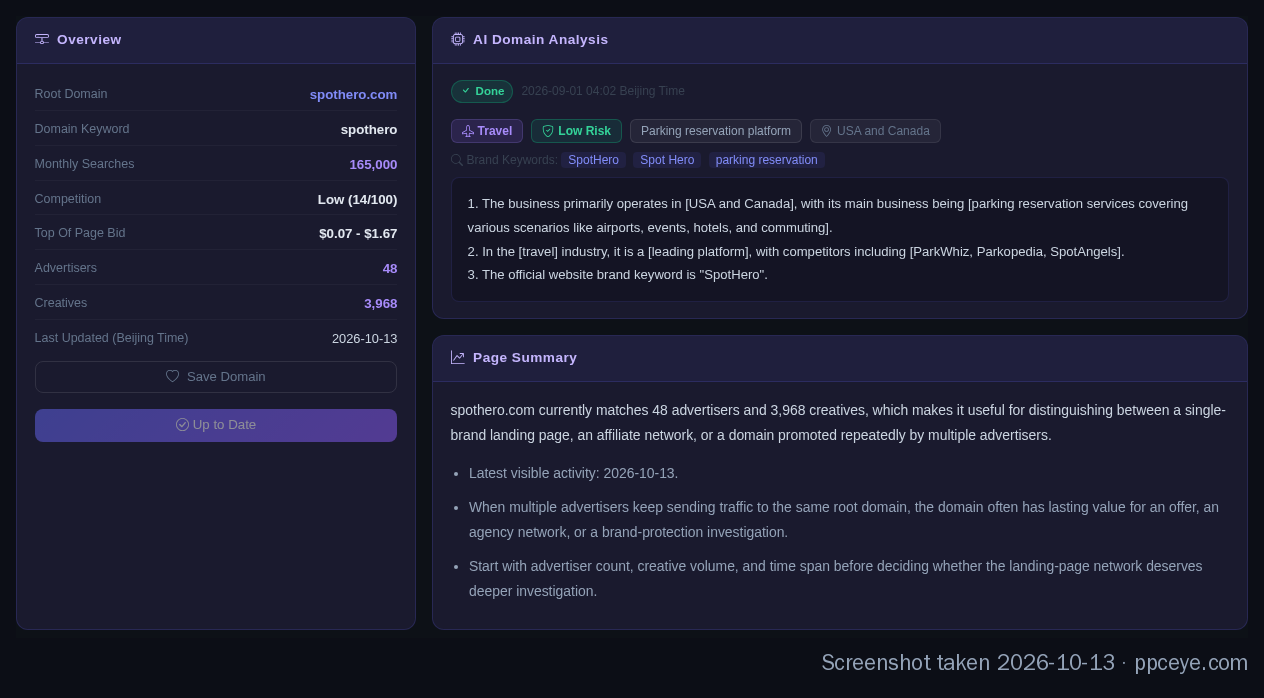
The spothero.com domain page. The keyword numbers come from Google's Keyword Planner and are refreshed when the domain is synced.
Reading down the advertiser list:
- SpotHero Inc. — the brand itself. Every one of its ads points to a single landing domain, spothero.com. Its records in the archive go back to October 2021 and it is still running.
- Mainstream Advertising — open it and its ads point to more than 70 unrelated domains, from window blinds to airline tickets. That is not a parking company. It is an agency buying traffic for many clients, and SpotHero's term is one job among many.
- The rest — mostly small operators: small companies and individual advertisers. This is brand bidding in its usual form: buying someone else's brand name as a keyword and sending the click to an affiliate link or a comparison page.
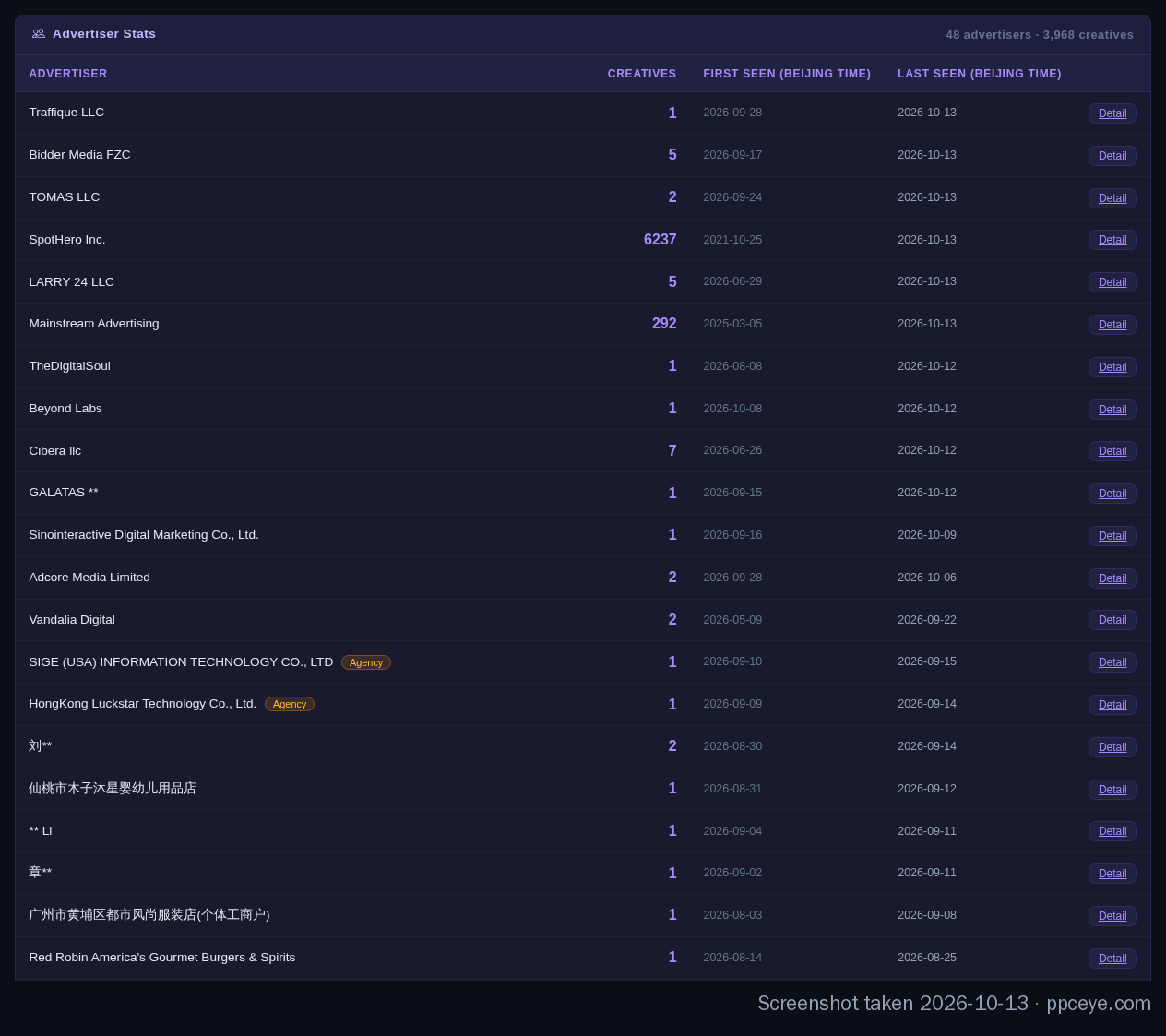
The first rows of the advertiser list, most recently active first. Names of private individuals are cut down to the surname.
In a few minutes you know three things no amount of searching would have told you: who is on the term, what kind of operator each is, and when each one arrived.
Landing-domain count: the fastest way to tell who you're up against
In that example, one number did most of the work: how many different domains an advertiser's ads point to.
| Pattern | What it usually means | Example |
|---|---|---|
| 1–3 domains, all its own | A brand advertising itself | Tripadvisor: heavy volume, only 3 domains — tripadvisor.com, viator.com and bokun.io, all Tripadvisor businesses |
| Hundreds to thousands of domains, one industry | A service provider or agency buying for clients | Dealer Spike: 1,800+ domains, nearly all US car, motorcycle and RV dealerships |
| Dozens of domains, unrelated industries | An agency or a multi-offer media buyer | Mainstream Advertising above: 70+ domains |
| A small entity with a few domains, recently arrived | A brand-bidding affiliate testing an offer | Most of the small advertisers on spothero.com |
Why the distinction matters: these are different opponents. A brand on your term is head-on competition for the same customers. An agency on your term means the real competitor is its client, and that is who you need to identify. A crowd of small entities arriving at once usually means your brand term has been picked up by the affiliate crowd.
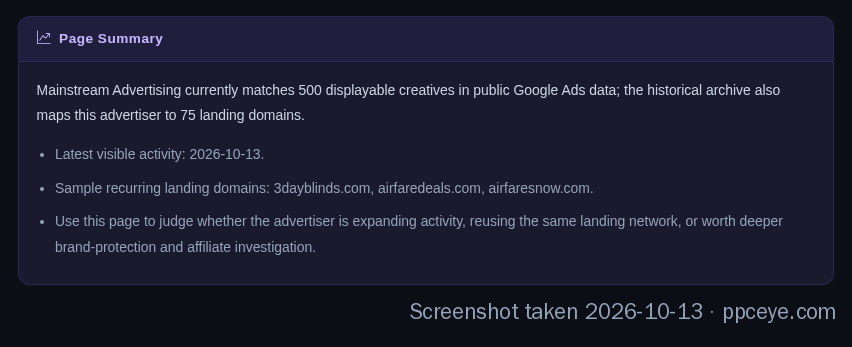
Mainstream Advertising: the archive maps it to dozens of unrelated landing domains.
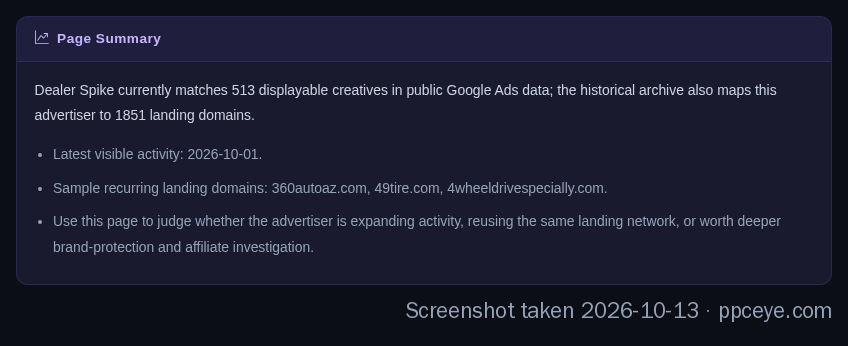
Dealer Spike: 1,800+ landing domains, almost all of them vehicle dealerships.
Run duration matters more than the creative
Most people studying competitor ads go straight to the copy and the images. Useful — but one piece of information matters more and is easy to overlook: how long the ad has been running.
The logic is simple. Search ads are pay-per-click with no organic traffic to dilute the cost; every click is billed. An ad that loses money gets switched off sooner or later — nobody pays out of pocket to keep a losing search ad alive for a year. An ad that has run continuously for hundreds of days is, in almost every case, an ad that pays for itself. It is a strong signal, not a guarantee.
Back to SpotHero. As of early September 2026, among the small advertisers that followed it onto its brand term:
| How long they lasted | Share of followers |
|---|---|
| 7 days or less | about 39% |
| More than 6 months | more than 1 in 5 |
| Longest single ad | TKTX: one creative from May 2024 to December 2025, 569 days |
(TKTX, for what it's worth, points at more than 2,200 different domains. It is not a parking business; it is an operation running many offers at once.)
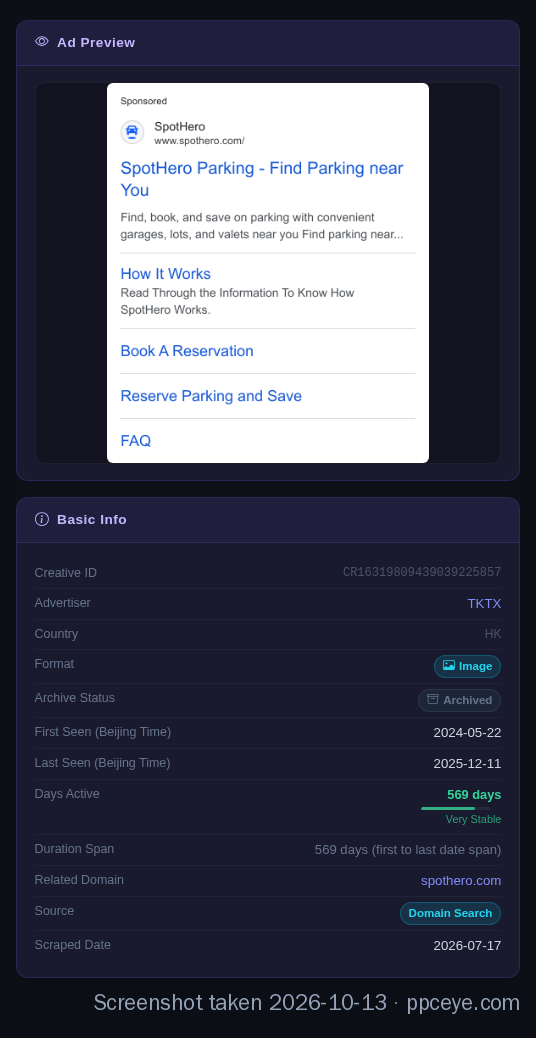
TKTX's longest-running creative on spothero.com: first seen 2024-05-22, last seen 2025-12-11 — 569 days.
That table is far more useful than "how many people are bidding". A crowded term may only mean a lot of people tried it and left. The ones worth studying are the survivors: which countries they target, how they write the ad, what their landing page looks like.
PPCEye labels each ad by consecutive days live — New (under 30), Growing (30+), Consistent (90+), Stable (180+), Very Stable (a year or more) — and an advertiser page can be filtered by run length. When I look at a new competitor, I filter to Stable and Very Stable first and study only those. It is much faster than paging through hundreds of creatives. The longer version of this argument is in Using Run Duration to Tell Which Google Ads Are Actually Profitable.
If you're an affiliate deciding whether to run an offer
Before you spend the first dollar, you can read the state of an offer from public data. I check three things on the merchant's domain:
- Does the brand bid on its own name, and for how long? A brand that pays for its own term year after year is telling you that traffic is worth money.
- When did the followers arrive? If most showed up in the last month or two, the offer has only recently been found.
- How long do the followers last? This is the one that matters. If most disappear within a week, be honest about why you would last longer than they did.
Add the keyword numbers on the domain page — monthly searches, competition and bid range, from Google's Keyword Planner (Search network, a 12-month average, for the bare brand name) — and you have a reasonable first read on an offer. How to interpret those four numbers is covered in Reading the Keyword Metrics on a Domain Page.
One more check that costs nothing: read the affiliate program's terms. Many programs forbid bidding on their brand name, or using it in ad copy, and reverse commissions or close the account when they catch it. Find out which kind of program you're in before you build a campaign around it.
If you're the brand being bid on
Once you know who is on your term, the next question is how to make them stop. A common point of confusion: someone buying your brand name as a keyword and someone putting your brand name in their ad are treated differently under Google's trademark policy, which says:
The trademark must be used in the ad, not only on the ad's landing page.
In practice, a competitor that only bids on your brand keyword, without your name appearing in the ad text, generally falls outside what a trademark complaint can stop. If your name is in the headline or description, you have grounds to file. And if the bidders turn out to be affiliates in your own program, your program terms are a faster lever than Google.
Either way, collect evidence first: which advertiser, which ad, when it started, where it lands. All of that is on the advertiser page — save the link or a screenshot. The full checklist and a takedown template are in A Brand Bidding Evidence Checklist.
What it can't do
- Google Search ads only. YouTube, Display Network and Shopping ads are not included.
- No spend, clicks or impressions. Google's public archive doesn't contain them. Any tool that tells you exactly what a competitor spent is giving you an estimate.
- No keyword list. The archive publishes creatives and landing pages, not the keywords behind them.
- No alerts. To keep watching a competitor today, you add it to your favorites, write a note, and come back on a schedule. That's a manual sweep, and we know it.
- Free visitors see data with a 30-day delay, and the number of detail pages you can open per day is capped. Full, current data needs an account.
How to start
You don't need an account to try it. Go to ppceye.com, type your own domain — or the domain of the merchant or competitor you care about most — and look at the advertiser list.
To see full data, sign up with your Google account; new accounts get a period of full access. Spend it on the three to five domains you care about most and answer the three questions for each: who is on it, what kind of operator, and how long they've lasted. If that turns out to be useful, the plans are on the pricing page.
FAQ
Where does the data come from, and can I trust it?
From Google's official public ad archive, the same data behind the Google Ads Transparency Center. We collect and reorganize it; the ad records themselves are not estimated — every one is an ad that actually served. If the archive doesn't have it, neither do we.
Can I see which keywords a competitor is bidding on?
Not directly. Google publishes creatives and landing pages, not keywords. But if an advertiser's ads land on a merchant's domain and carry no other obvious theme, it is very likely buying that merchant's brand term.
Isn't the Google Ads Transparency Center enough?
For looking up one company you already know, yes — use it, it's free. It falls short when you need to start from a domain and get a de-duplicated list of advertisers, or rank ads by how long they've run. That needs aggregation the official interface doesn't do.
How is this different from SpyFu or Semrush?
Different question. They estimate what a keyword is worth and how much traffic it gets. PPCEye shows who actually ran ads, what the ads were, and for how long. If the budget allows, they work well together.
Why do some advertisers vanish after a few days?
Usually one of two reasons: the campaign wasn't profitable, or it got caught — by the brand, by the affiliate program, or by Google. Short-lived advertisers tell you a term is easy to enter, not that it is easy to make money on.
Landing-domain counts are taken from PPCEye's pages in October 2026 and written as lower bounds. SpotHero follower survival figures are as of 2026-09-06. Keyword metrics are as shown on the domain page at the time of writing. Screenshots were taken on 2026-10-13. Live pages take precedence. The trademark-policy quotation is from Google's Trademarks policy in the original English.